
How collaborative editing works in Curiosity Studio, and how an assistant writes beside you
 Rafael
Curiosity Studio now has real-time collaborative editing. A new Documents page lets people write the same document at once, with everyone's caret and name in the text, an Edit, Preview and Side by side view, and a version history that compares any two versions and restores an earlier one. The code editors on the admin pages are co-edited the same way. And an AI assistant can write in a document while people have it open: its edits arrive under its own name, with its own caret, a few words at a time.
This post is how it works: the data structure that makes concurrent edits merge, the server that holds a session for each open document, how the text reaches the graph and its history, and what an assistant goes through to edit a text someone else is typing in.
Edits that merge instead of overwriting
The usual way two people break each other's work is last write wins: both load the text, both change it, and the second save erases the first. Our admin code editors defend against that by refusing the second save with a conflict and showing a diff. That keeps the work safe, but it still leaves two people resolving by hand what they could have written together.
Collaborative editing avoids both with a CRDT, a conflict-free replicated data type: a data structure every participant holds a copy of, where any two copies that have seen the same changes hold the same text, in whatever order the changes arrived. A change is not "the text is now X". It is "insert these characters after that character" or "delete those characters", with every character carrying a stable identity. Two people typing in different paragraphs produce changes that do not touch each other. Two people typing at the same spot produce a deterministic order that every copy agrees on.
We did not write our own. The browser runs Yjs, a widely used open source CRDT library for shared text, bound to the Monaco editor the workspace already uses. The server runs YjsSharp, a pure C# port of Yjs we wrote for this and published under the MIT license. It speaks the same binary update format and the same sync and awareness protocols, so a change made by C# code on the server and one typed in a browser are the same kind of thing.
One live session per open document
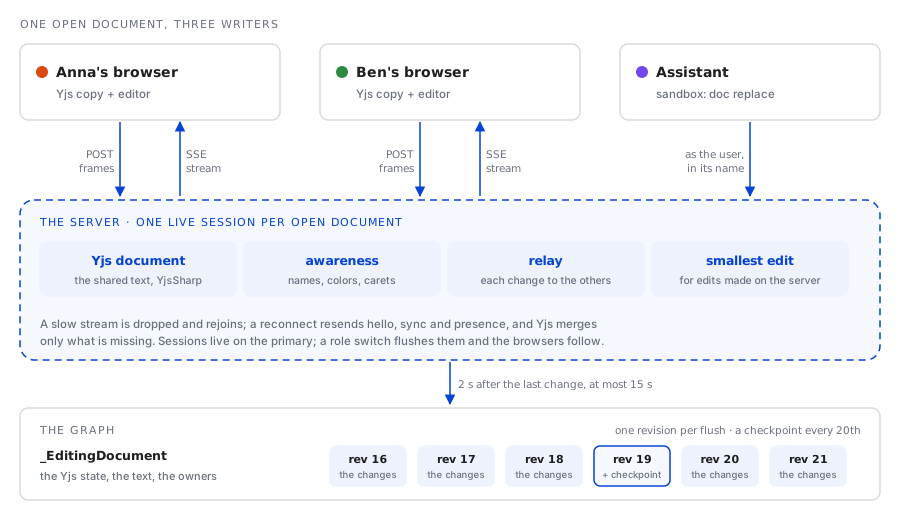
When the first person opens a document, the server creates its session: a Yjs document loaded from the stored state, and an awareness, the Yjs name for the small shared record of who is here and where their caret is. Each browser that joins gets a connection in that session.
The transport is two plain HTTP routes rather than a websocket. A browser posts its changes to
editing/session/message as y-websocket frames, one base64 frame per line, and reads everyone
else's from editing/session/stream, a server-sent event stream of its own. That is the rule the
product follows for every live view: a page that shows something changing gets a scoped event
stream, opened when the page appears and closed when it goes. The stream carries five events:
hello, m for a frame, participants, saved and closed, plus a ping every 20 seconds so no
proxy on the way decides the connection is idle.
A few decisions in the session are there because a network is involved:
| What happens | What the session does |
|---|---|
| A stream reconnects on its own | It is sent hello, a sync request, everyone's presence and the participant list again. Yjs merges only what either side lacks, so a resync is safe at any time. |
| A browser cannot keep up | Its queue holds 4,096 events. Past that it is dropped with a closed event and rejoins, rather than holding back everyone else's changes. |
| A stream ends | The connection has 30 seconds to come back before it is taken out of the session and its caret disappears. |
| Nobody has the document open | The session is flushed and dropped after 5 minutes. |
| The server stops being the primary | In a cluster, sessions live on the primary only. A role switch flushes every document, closes every session, and the browsers rejoin wherever the primary now is. |
| A read-only user joins | Their document updates are dropped; they still see everyone else's edits and carets. |
A Yjs document is not thread-safe, so everything that touches it in a session (a frame from a browser, an edit made by the server, a flush) takes the session's lock. The relay to the other connections happens inside the change event, as a queue write that never waits.
Saving is something the session does
Nobody presses Save on a document. The session writes it to the graph 2 seconds after the last
change, and at most 15 seconds after the oldest unwritten change while people keep typing. Each
write stores the document's full Yjs state and its plain text on its _EditingDocument node, and
adds one _EditingDocumentRevision: the changes since the previous write, merged into one Yjs
update, and the names of everyone who made them.
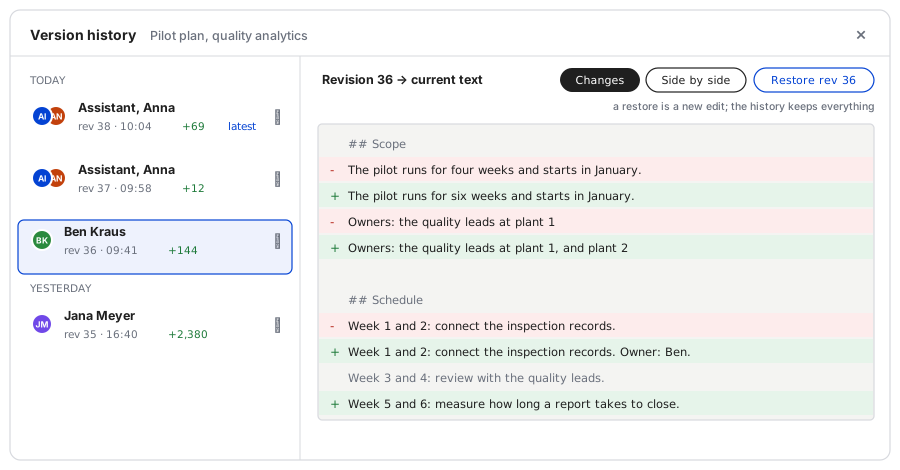
That is what the history is built from. Replaying the revisions in order rebuilds the document as of any one of them, and every 20th revision also carries the whole document, so reading an old version replays at most 19 increments from the nearest checkpoint. Comparing two versions is a unified diff of two such texts. Restoring an old version does not rewind anything: it sets the text back as a new edit, recorded under the person who restored it, so the history only ever grows.
The admin code editors
The admin pages use the same sessions with one difference: the session is not the item's storage. That covers endpoints, AI tools, prompt templates, agents, skills, scheduled tasks, migrations, code indexes, entity post-processing and the front end's files. An endpoint is still saved by its Save button, through its own save path, with the code hash check it always had. What changes is what happens before the save.
When an admin opens an endpoint, their editor joins a session keyed by the item (build: plus its
kind and id), seeded with the text that admin loaded if nobody else has it open. A second admin who
opens it gets the session's text, unsaved edits included, and both see each other's carets. When
one of them saves, the session tells the others with a saved event carrying the new code hash.
Their editors take that hash as the one their next save is checked against and mark the text as
saved. The conflict check is still there; it no longer fires between two people who were editing
the same text together.
These sessions are kept in memory only. A read-only administrator joins as a viewer.
How an assistant writes in a document people are reading
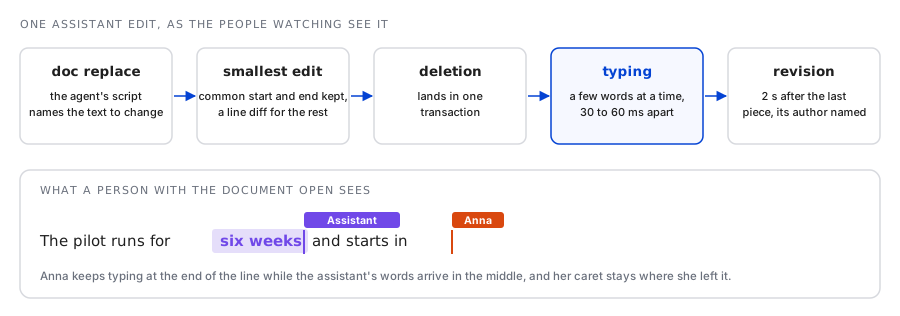
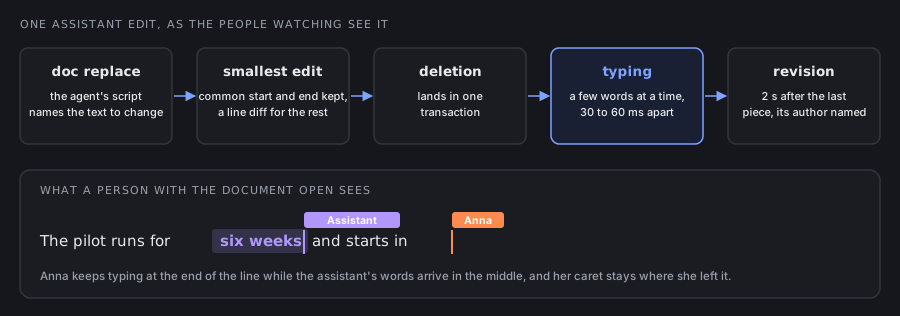
An assistant does not have a browser. Its edits are made on the server, in the document's live session, and three things make them behave like a person's.
The smallest edit, not a replacement
Code that sets a document's text could delete everything and insert the new version. In a shared text that is destructive: every other person's caret jumps to the start, and every character is attributed to whoever set it. So the server turns "the text is now X" into the smallest change that gets there. It keeps the common start and end, and when the changed middle is still large and spans lines, narrows it further with a line diff. An edit to two paragraphs of a long document touches two paragraphs.
Typing, at a position that moves with the text
By default an assistant's insertion arrives a few words at a time, 30 to 60 milliseconds apart, so the person watching sees it written rather than appearing as a block. A long insertion is split into at most 150 pieces, so watching it takes seconds, not minutes. Each piece is inserted at a Yjs relative position: a position attached to a character rather than to an index, which stays correct when someone else types above it while the assistant is mid-sentence.
A presence of its own
Each assistant working for a person has one awareness entry, with a stable color and its name beside its caret, shown while it writes and removed 10 seconds after its last edit. In the history its edits are recorded under an identity of their own, with the assistant's name, so a revision names the assistant apart from the person it worked for.
From the sandbox: the doc command
The way an assistant reaches documents is the same sandbox the workspace's other assistants use
(the previous post describes it). A sandbox that declares
Editing gets a doc command:
public class DocumentEditorSandbox : ISandbox
{
    public string Description  => "The workspace's collaborative documents: list them, read them, and write in them while people watch.";
    public string FunctionName => "documents";

    public SandboxMount[] Mounts => new[]
    {
        SandboxMount.Scratch("/work", "scratch space - a draft before it goes into a document"),
    };

    public SandboxEditingAccess Editing => SandboxEditingAccess.Everything();
}
SandboxEditingAccess.Everything() is every document the person chatting can open, plus creating
new ones. ForDocuments(...) and ForCategories(...) narrow it, .ReadOnly() takes writing away,
and .WithoutTyping() makes insertions land at once. Whatever the access says, the command acts as
the person whose chat it is: a document they cannot open does not exist for the assistant, and one
they cannot change is refused by name. A refusal is never reported as an empty list, because an
agent reads "no such document" as a fact about the workspace.
A person asks their assistant to bring a project plan in line with a decision from this morning, while a colleague has the plan open:
$ doc list
#uid	access	language	length	updated	name
4Kq8vRt2LmZc9Xn3Wb7Hpe	rw	markdown	6214	2026-11-20 09:12	Pilot plan, quality analytics
8Hd2nWq5Tz7Lk3Vc9Rb1Mx	ro	markdown	2380	2026-11-18 16:40	Steering committee notes

$ doc cat 4Kq8vRt2LmZc9Xn3Wb7Hpe | grep -n "weeks"
14:The pilot runs for four weeks and starts in January.
31:Week 3 and 4: review with the quality leads.

$ doc replace 4Kq8vRt2LmZc9Xn3Wb7Hpe "runs for four weeks" "runs for six weeks"
replaced 1 occurrence in 4Kq8vRt2LmZc9Xn3Wb7Hpe

$ cat /work/weeks-5-6.md | doc append 4Kq8vRt2LmZc9Xn3Wb7Hpe
appended 412 characters to 4Kq8vRt2LmZc9Xn3Wb7Hpe

$ doc history 4Kq8vRt2LmZc9Xn3Wb7Hpe | head -3
#index	uid	time	length	authors
37	2Vb6mQx9Tk4Ln8Rc3Wd7Hz	2026-11-20 10:04:51	6629	Quality Assistant, Ben Kraus
36	7Ty3pLw8Nc2Kx6Vm9Qb4Rd	2026-11-20 09:58:12	6211	Ben Kraus
The session is shortened and its records are made up. What the colleague sees is the assistant's caret appear on line 14, "four" replaced by "six" while they keep typing further down, and the new section written in at the end. Revision 37 names both of them. In the chat, the document opens beside the conversation, live, so the person who asked watches the same thing.
The command's help says the rest of what an agent needs: prefer replace and append to write,
because they leave what other people are typing elsewhere alone. doc write is there for a
rewrite, and even then it goes through the smallest edit. A sample sandbox called Document Editor
is seeded in every workspace with this code, and given to no assistant until an admin enables it.
From any code: the Editing helper
Sandboxes are one caller. Every code scope that has ChatAI (an endpoint, a scheduled task, an AI
tool's methods) also has an Editing helper with the same operations, acting as the scope's user, and read-only in the
read-only scopes. AsAssistant(name) makes its edits show under an assistant's name. A scheduled
task that appends the night's incidents, summarized, to a shared log needs two calls:
var summary = await ChatAI.SummarizeAsync(incidentsText);

await Editing.AsAssistant("Night shift summary")
             .AppendAsync(logDocumentUID, "\n\n## " + DateTime.UtcNow.ToString("yyyy-MM-dd") + "\n\n" + summary);
A custom front end gets the editor itself as a component: new CollaborativeEditor(documentUID)
is the Documents page's editor, with its participants, preview and history, ready to put on a
screen of an application's own.
How it was checked
CollaborativeEditingTests, 14 tests, runs two simulated browsers, each a YjsSharp document speaking the
y-websocket protocol to a real session, and checks that they sync and relay, that a read-only
participant's updates are dropped, that a caret goes away when its browser leaves, and that an
assistant's presence appears and expires. The flush runs on a manual clock, so the tests can say
that a burst of edits produces exactly one revision and that the 15 second cap holds. They also
replay a history across a checkpoint, diff and restore, seed and abandon a Build-view session, test
a typed insertion against a concurrent edit, and check that the doc command stays inside its
fence. On a running workspace, driven with Playwright, two users editing one document converged
with their carets and history, two admins co-edited an endpoint and a save caused no conflict, and
a sandbox fenced to one category typed into a document live and was refused outside it.
The feature was built in one branch with Claude Code as co-author on its commits, and I reviewed
and merged it. The collaborative-documents skill, which Sudo reads before he writes code that
uses any of this, was written in the same branch.
Read next
Articles on context graphs, enterprise search and industrial AI