
A2UI 1.0, and how Curiosity Studio uses it to let an assistant build an interface you use
 Rafael
On November 11 Google released A2UI 1.0, the first stable version of its Agent-to-User Interface protocol. With A2UI an agent answers with a form, a list or a chart instead of a paragraph. It sends the interface as JSON, and the application draws it with its own components. We put it into Curiosity Studio this week: an AI assistant can now publish an interface that a person uses, not only a page they read.
What A2UI is
A2UI describes an interface as data, not code. The agent sends four kinds of message.
createSurface opens an area to draw in and names the catalog of components it may use.
updateComponents sends the components, updateDataModel sets values, and deleteSurface closes
the area. Components are a flat list, each with an id, pointing at each other by id, with one called
root. They can arrive in any order, so an interface fills in while the model is still writing it.
{ "version": "1.0", "updateComponents": { "surfaceId": "main", "components": [
  { "id": "root",  "component": "Column", "children": ["h", "days", "send"] },
  { "id": "h",     "component": "Text", "text": "# Request time off" },
  { "id": "days",  "component": "Slider", "label": "Days", "min": 1, "max": 14, "value": { "@path": "/days" } },
  { "id": "send",  "component": "Button", "variant": "primary", "child": "send_t",
    "action": { "event": { "name": "submit_time_off", "context": { "days": { "@path": "/days" } } } } },
  { "id": "send_t","component": "Text", "text": "Send the request" }
] } }
A value written as {"@path": "/days"} is bound to a JSON Pointer in the surface's data model. An
input writes what the person types to that path, and everything that reads the path follows it.
Lists can be templates over an array in the data model. Checks such as required or email show a
message and disable a button. A button's action is either an event sent back to the agent, or a
function that runs where the interface is drawn.
The application decides what can be drawn. The agent may only place and configure components from a catalog the application registered. The basic catalog has 18 components and 14 functions. The components are text, image, icon, row, column, list, card, tabs, divider, modal, button, text field, checkbox, choice picker, slider, date input, video and audio. Version 1.0 adds function calls in both directions: the agent can call a function the renderer provides, and the renderer can ask the agent mid-interaction. Google publishes renderers for React, Angular, Lit, Flutter and SwiftUI (Jetpack Compose is still on 0.9.1), and agent SDKs for Python, TypeScript and Dart.
There are other answers to the same question. MCP Apps, proposed by the MCP maintainers at Anthropic and OpenAI with the MCP-UI authors, delivers HTML that the host shows in a sandboxed iframe. Fabian Kübler's fenced lets the model write React code inside Markdown and runs it. Its author calls prompt injection "the hard unsolved problem" and leaves it open. A2UI sits at the other end: nothing the model writes is executed, and the interface looks like the rest of the application because it is drawn by it. Which end fits depends on whether you need arbitrary visuals or need to trust what is on the screen.
A renderer for our front end, written the next day
Curiosity Studio's front end is written in C#. Our Transpose compiler turns it into JavaScript, and our Tesserae library draws it. None of Google's renderers fits that, so on November 12 we wrote one: Tesserae.A2UI, published on NuGet.
It maps each basic component onto a Tesserae one: Tabs onto a Pivot, TextField onto a text
box or a text area. It implements all 14 functions, the validation checks and the protocol's error
messages. Bindings are tracked per path, so a value re-evaluates only when data it read changes. A
template list rebuilds only when its length changes, so typing into a field inside a list does not
redraw the list. An application adds its own components by registering a catalog under its own
id, with no change to the renderer.
A coding agent wrote it from the specification, which we kept beside the code, and I reviewed and merged it. The check is a sample gallery that draws all 43 examples from the A2UI repository next to the messages that produce them. A Playwright suite opens every example and fails on any console error or renderer problem. It also exercises binding, actions, templates and function calls, and draws the showcase page in all 15 Tesserae themes, light and dark.
Why an agent's interface runs no code
An agent's output is shaped by everything it read: a supplier notice, an email, a web page, a ticket somebody else wrote. Any of that text can carry instructions meant for the model. This is prompt injection, and no model reliably ignores it. If the interface is code the model wrote, injected text can become code that runs in the person's browser session. That code can read what the page shows, call the application's API with the person's credentials, or draw a fake sign-in form.
A2UI closes that route by not having code in the document at all. The document is JSON checked
against a schema. Every component names a type from a catalog the application registered. A type
or catalog the renderer does not know is reported as an error, never guessed at. The renderer
builds every element itself, from its own components. Nothing the agent sends is inserted into the
page as HTML or run as script. Functions such as formatDate or required are ones the
application implements, and by default the agent cannot call any of them on its own.
Tesserae.A2UI is strict about the places where text could turn into markup:
Textis Markdown rendered with links and embedded content removed, so it cannot carry raw HTML or a script tag.- An icon drawn from SVG path data accepts only path commands and numbers. Any other character draws nothing.
- Image, video and audio URLs must be
http,https,dataor on the same host. openUrlopens onlyhttpandhttpsaddresses, and only from a person's click.- The package has no JavaScript of its own beyond formatting numbers and dates, resolving URLs and opening a window.
This does not make injected text harmless. It can still change what an interface says, or which buttons it offers. What such a button can then do is limited by how Studio runs tool calls, below.
Interfaces as artifacts in Curiosity Studio
Assistants in Studio already make artifacts: a document, a table, a Word file, a deck, or an HTML page shown in a sandboxed frame with no network. An HTML page is static. It shows what the model knew when it wrote it.
An interface is a new kind of artifact, a file ending in .a2ui. The assistant writes it in its
sandbox and runs publish. That checks the document and says what is wrong with it: no surface, a
tool the conversation does not have, a file that is not there. The file holds the A2UI messages,
plus two things of ours:
{
  "title": "Sales by region",
  "files":   { "invoices": "/work/invoices.csv" },
  "sources": [ { "id": "sales", "tool": "Sales Report", "function": "RegionalSales",
                 "into": "/sales", "refreshSeconds": 30 } ],
  "messages": [ ... ]
}
files publishes files from the sandbox with the interface: a CSV becomes rows in the data model,
an image becomes a URL. sources runs an AI tool or a sandbox command when the interface opens and
writes the result into the data model. The interface shows the data as it is now, not as it was
when the assistant wrote it. A button can run the same calls through a function we added,
invokeTool.
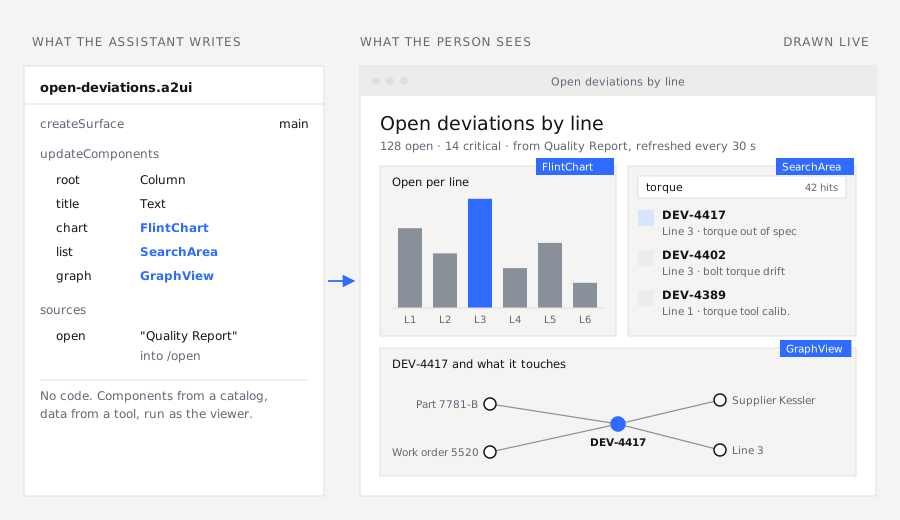
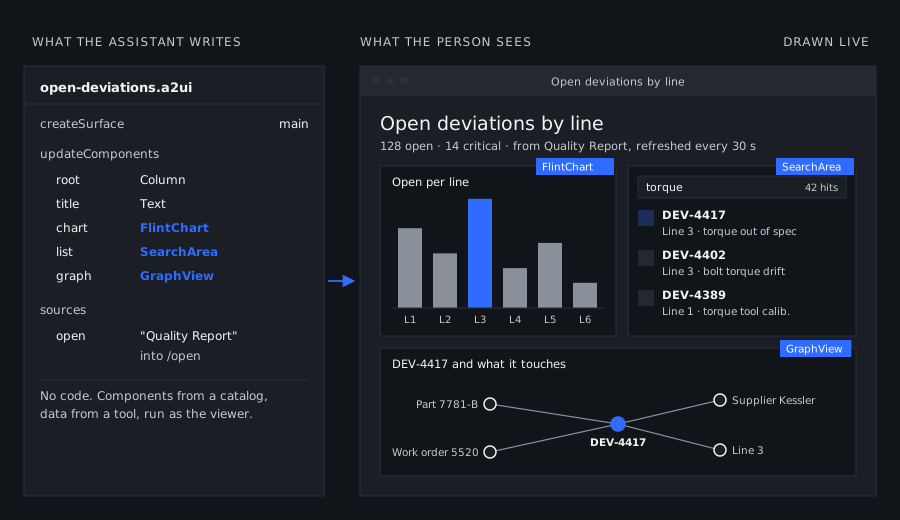
Three more components come from extension catalogs of ours, each named on the component with
@catalogId. FlintChart draws charts with Microsoft's Flint over Vega-Lite. SearchArea is
Studio's own search, with its facets and result views, limited to given types or to a list of
record ids. GraphView is the graph view from a record's Graph tab, drawn over a list of ids.
The dashboard above uses all three. A tool counts open deviations per line for the chart, and the
search area lists the deviation records. The graph shows one deviation with what it is connected
to.
Who the tools run as
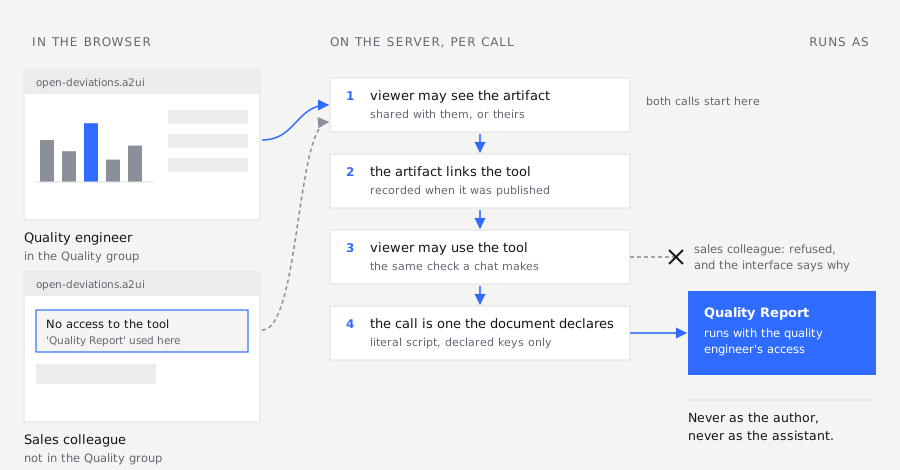
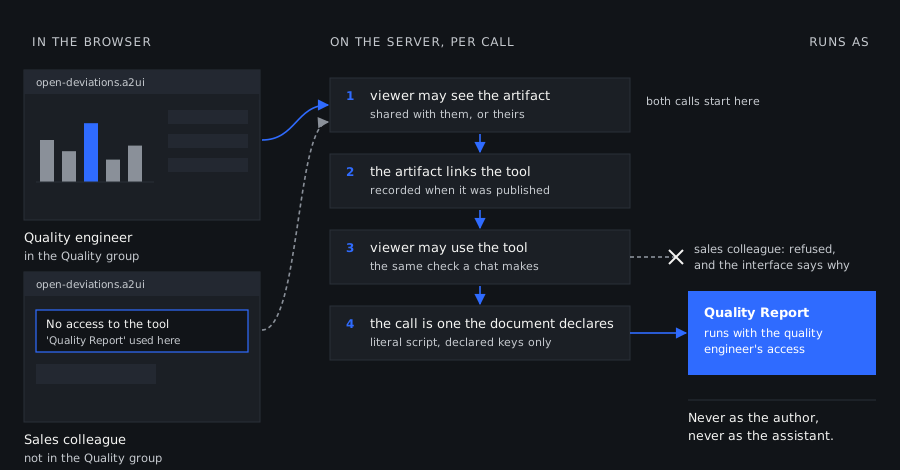
People other than the one who asked for it open a published interface. So the question that matters is whose access its calls use. They use the access of the person looking at it, not the author's or the assistant's.
The document stores calls, not results. A dashboard whose numbers were computed when the assistant built it would carry the author's view of the data. Records the author may see and a viewer may not would be baked into the page, and shown to everyone it is shared with. Access control would then depend on who asked for the dashboard, not on who is reading it.
So nothing computed is stored with an interface. Each time someone opens it, their browser asks the server to run the declared calls again. The tool runs with that person as its current user, the same way it does when they call it in a chat. Studio checks permissions per record when a query runs, so a tool that reads the graph sees only the records that person may see. The search area and the graph view work the same way. Two people can open the same dashboard and see different numbers, and that is the intent. The price is that every call runs again for every viewer and every refresh.
The exception is files. A file published with an interface is a copy taken at publishing,
readable by anyone who can open the interface. Data that should follow each viewer's access belongs
in a source.
Publishing records which AI tools and sandboxes the conversation had. When a call arrives from the browser, the server checks three things: the viewer may see the artifact, the artifact links the tool, and the viewer may use the tool. That last check is the one a chat makes before it hands the tool to a model. A tool the viewer may not use fails with that said, above the interface.
The server also runs only what the stored document declares. A call has to match one written in
the artifact: the same tool and function, and a script that is a literal string. In the arguments,
a literal value must match, and a value bound to the data model can be whatever the person typed
or picked. A key the document did not write is refused. publish refuses a script or a function
name that is bound to data. A person can choose a region from a picker. Nobody can turn a text field
into a command line, not even by editing the request in their browser.
Back to injected text. Suppose it talks the assistant into a button labeled "confirm purchase".
That button can only make a call the published document declares, with the access of whoever
presses it. The skill that teaches assistants to write interfaces adds one more rule: anything with
a side effect (sending, deleting, paying) is an event, not an invokeTool. The work then happens in
the assistant's next turn, where the person sees what it is about to do and confirms it.
Events back to the conversation
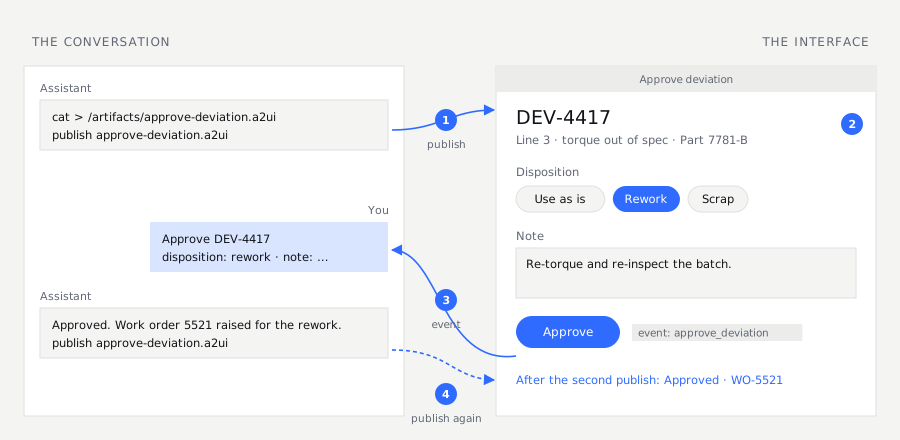
An event from an interface arrives in its conversation as a message from the person: the
userMessage the document gave the button, with the values it carried. The assistant answers it,
calls tools, and can publish the interface again under the same name, which replaces it in place.
An approval list can mark the item approved, and a form can show the next step.
Interfaces live in each person's Artifacts space, where the owner can share one with colleagues. A shared interface is view only: its tools run as the colleague, and what they do in it does not come back to the author's conversation. So an interface meant for a team does its work through tools, not events.
An assistant can also look at what it built. render opens the published interface in the
workspace's own browser, signed in as the person it is for. It waits until the calls have answered
and attaches screenshots to the conversation. The assistant sees what a person would see,
including an access error.
All of this applies to Sudo, Studio's admin assistant, as well. He can also link his own workspace shell to a button, read only and for administrators only. That is how a button can count the records of a type.
What it does not do
- The
files,sourcesandinvokeTooladditions and our three extension catalogs are not part of A2UI. Another renderer draws the basic components of an.a2uifile and ignores the rest. - An assistant cannot add a component. It uses the basic catalog and our three extensions. A workspace that needs another one registers it in its own front end.
- Each sandbox call runs in a fresh session. Nothing a script writes is there for the next call.
You can try the protocol without Studio: the A2UI Composer runs in the browser, and the Tesserae.A2UI gallery draws every example from the specification.
Further reading
- A2UI 1.0: Build delightful, fast, reliable, agentic experiences, Google Developers Blog. The release: what 1.0 adds, the renderers and SDKs, the early adopters.
- The A2UI v1.0 specification, a2ui.org. The messages, the data model and the basic catalog, with examples.
- MCP Apps: Extending servers with interactive user interfaces, the Model Context Protocol blog. The HTML-in-an-iframe approach, and its security model.
- I turned Markdown into a protocol for generative UI, Fabian Kübler. The opposite trade-off: generated code, executed, with security left open.
- A2UI: A Protocol for Agent-Driven Interfaces, Hacker News. The discussion of the first announcement, whose main objection is trust in a generated interface; the section on who the tools run as answers it.
Read next
Articles on context graphs, enterprise search and industrial AI