
One sandbox harness for Sudo, the graph assistant, and the assistants you build
 Rafael
Every AI assistant in Curiosity Studio runs on the same harness. By harness I mean everything in an assistant except the model: the place its commands run, the files it can see, the limits on what a command may do, how its work survives between calls, and how a change it makes reaches anyone. Sudo, the admin assistant, was the first thing built on it. The graph assistant, the review conversation and the test runner are Sudo again, with a different sandbox and a different prompt. And the assistants a workspace builds for its own people use the same harness through one C# interface.
This post is about that arrangement: what the shared part is, what each variation of Sudo changes, and what teams have built on it. HubSpot's engineering team wrote recently about Aviator, the framework their internal agents are built on, and reading it made me want to write down ours.
What the harness is
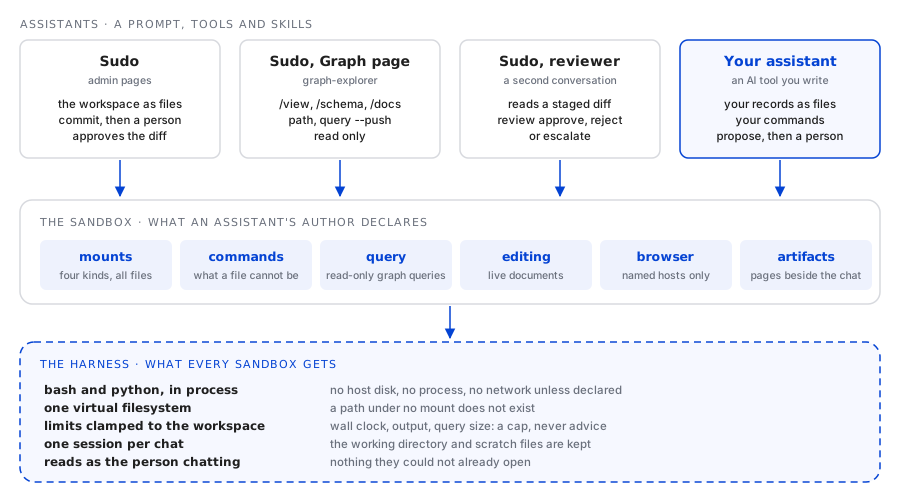
An assistant in Studio is a prompt, a set of AI tools and a set of skills. The interesting tools are sandboxes: a tool that does not call one method but runs a bash script, with Python available, over a filesystem built for that assistant. The interpreter is Computerwelt, our C# port of a sandboxed bash and a minimal Python, running in the server process. It starts no process, touches no host disk, and has no network.
The harness is what every one of those sandboxes gets without asking for it:
| What the harness gives | What it means in practice |
|---|---|
| bash and Python, in process | about 120 commands: grep, rg, sed, awk, jq, yq, sort, diff, python and the rest |
| one virtual filesystem | a path under no mount does not exist; there is no root to write to |
| limits clamped to the workspace | an AI tool's script runs 60 seconds by default and 300 at most, and prints 256 KB by default and 4 MB at most |
| one session per chat | the working directory and the scratch files are there on the next call, and after a restart |
| reads as the person chatting | a query, a search or a file built from the graph shows only what that person may open |
What an assistant's author writes is the other half: the mounts (which folders exist and what is in
them), the commands that a file cannot be, and a handful of switches for the graph query engine,
live documents, a browser and artifacts. Everything in that half is specific to one assistant.
Everything in the harness is shared, so a fix to the harness reaches every assistant at once, and
a command two assistants share is one implementation: the graph assistant's graph and query are
the same command classes Sudo's shell runs, so the two answer the same question the same way.
Sudo, the first and largest
Sudo is the admin assistant. His sandbox is the workspace shell, and its main folder,
/workspace, is the workspace configuration as files: one file per endpoint, AI tool, agent,
scheduled task, index and schema, exactly as the definitions export writes them. Around it sit the
front end's source, a reference workspace, the product's own C# surface as /sdk, live runtime
state as /proc, and about thirty workspace commands on top of bash. The earlier posts cover
how that shell replaced seventy-four tools and
why nothing he writes applies until a person approves it.
Here is what it looks like from the inside. The sessions in this post are shortened, and the
records in them are made up.
An engineer writes to the admin that they cannot see a non-conformance report their colleague can. The admin asks Sudo why:
sudo@workspace:~$ graph search "NCR-24-0193" -t NonConformance -n 1
5mP2cQkR8vZtWn3aLd7Hxe	NonConformance	{"NcrId":"NCR-24-0193","Title":"Crack at the weld seam of a gearbox housing",...}

sudo@workspace:~$ access j.meyer 5mP2cQkR8vZtWn3aLd7Hxe
user:     8HqWb2nKcV4sTe9mRz1Lpo  Jana Meyer
node:     5mP2cQkR8vZtWn3aLd7Hxe  NonConformance
type:     NonConformance has no node-type rule
owners:   Quality Plant 2 (access group) 3XyTq8mBe2LwVn5sKd9Rfa
verdict:  not visible
why:      owned only by Quality Plant 2, and this user is in none of its groups (member of Quality Plant 1)
Nothing changed, and nothing could have: access reads. The answer is a fact about the
workspace's access groups, and the admin decides what to do with it.
The same admin then asks for the overdue corrective actions on the quality dashboard to show their supplier. Sudo reads the schema, edits the endpoint, and builds it before he says anything:
sudo@workspace:~$ type CorrectiveAction
[schema: Curiosity.Schemas.Key("CapaId")]
public class CorrectiveAction
{
    public string CapaId { get; set; }

    public Time DueDate { get; set; }

    public string Status { get; set; }

    public string Title { get; set; }
}

sudo@workspace:~$ build
FAIL  code/endpoints/quality/capa-overdue.cs
        (38,41): error CS1061: 'CorrectiveAction' does not contain a definition for 'SupplierName'
0 of 1 file builds.

sudo@workspace:~$ graph sample CorrectiveAction | sed -n 2p | cut -f1 | xargs graph edges
#edge	count	targets (first 10)
RaisedAgainstSupplier	1	6Tb1rWq8Zk3mNc5Xv2Lpa9
ForNonConformance	2	9Pq3mZx7Lk2cVb8nRt4Wsd, 5mP2cQkR8vZtWn3aLd7Hxe

sudo@workspace:~$ sed -i 's/capa.SupplierName/SupplierOf(capa)/' /workspace/code/endpoints/quality/capa-overdue.cs
sudo@workspace:~$ cat >> /workspace/code/endpoints/quality/capa-overdue.cs <<'CS'

string SupplierOf(ReadOnlyNode capa) => Q().StartAt(capa.UID).Out(N.Supplier.Type, E.RaisedAgainstSupplier)
                                         .AsEnumerable().Select(s => s.GetString(N.Supplier.Name)).FirstOrDefault();
CS
sudo@workspace:~$ build
ok    code/endpoints/quality/capa-overdue.cs
1 of 1 file builds.

sudo@workspace:~$ commit -m "Show the supplier on overdue corrective actions"
M  code/endpoints/quality/capa-overdue.cs

1 file is waiting for the admin to review and approve.
Nothing has been applied to the workspace. Tell them what you changed and why, and stop there - they will approve it in the chat.
The supplier is not a field on the corrective action. It is an edge, and the compiler told him so
before anyone else saw the change. build compiles the changed file against the scope it will run
in, and commit refuses a file that does not build. What reached the admin is a diff in the chat with an Approve button. If
another admin had edited that endpoint in the meantime, commit would have refused with
CONFLICT and asked him to pull the other change first.
The variations
Once Sudo existed, the next assistants were cheaper to build than the first, because most of what they needed was already there. Each variation is Sudo's identity with a different sandbox, a different prompt, or a different place in the workflow.
| Variation | Where it runs | Its sandbox | What it may change |
|---|---|---|---|
| Sudo | beside the admin pages | the workspace shell | the configuration, through an approved commit |
| Graph assistant | the Graph page | graph-explorer: the view, the schema, the query docs |
nothing; it draws on the graph view |
| Reviewer | a conversation the workspace starts | the workspace shell, with review |
approves, rejects or escalates another conversation's commit |
| Tester | Manage, Operate, Tests | the workspace shell, read only, with the browser if allowed | nothing; it hands in pass, fail or skip |
| Task board conversations | one per card | the workspace shell, on its own branch | the configuration, through the approval level the board sets |
The graph assistant
The Graph page shows the workspace's data as nodes and edges. The assistant beside it is Sudo with
one sandbox, graph-explorer, next to the tools for reading skills and asking the user a question.
The sandbox is an ordinary implementation of the same ISandbox interface a workspace uses for its
own assistants. Its mounts are four folders:
public SandboxMount[] Mounts => new[]
{
    SandboxMount.Live  ("/view",   "the user's graph view, as it is now: nodes.tsv, selected.tsv and edges.tsv", ReadViewAsync),
    SandboxMount.Live  ("/schema", "node-types.tsv and edge-types.tsv with counts, nodes/<Type>.cs, connections/<Type>.tsv", ReadSchemaAsync),
    SandboxMount.Cached("/docs",   "query-language.md, query-methods.txt, and the query API as C#", ReadDocsAsync),
    SandboxMount.Scratch("/work",  "scratch space for intermediate results, UID lists and python scripts"),
};
/view is what the person has on screen, re-read before every script, so "these" in a question
means selected.tsv. /schema/connections/ says which edge types lead from a type to which other
types, which is what a traversal is written from. The commands are graph and query, the same
ones Sudo's shell runs, plus path and push, which draw on the page:
sudo@graph:/work$ cat /view/selected.tsv
#uid	type	label
7Rk2pLmQ9vXc4Tn8bWe1Ja	Supplier	Halvorsen Castings
2Wd9sNq4kTz7Lm3xRc8Vbp	Part	Gearbox housing, rear

sudo@graph:/work$ path 7Rk2pLmQ9vXc4Tn8bWe1Ja 2Wd9sNq4kTz7Lm3xRc8Vbp --push
7Rk2pLmQ9vXc4Tn8bWe1Ja	Supplier	Halvorsen Castings
9Pq3mZx7Lk2cVb8nRt4Wsd	NonConformance	NCR-24-0177 Porosity in casting
4Hn8vKc2Qw7xLp5mTz9Bre	Part	Housing casting, rear
2Wd9sNq4kTz7Lm3xRc8Vbp	Part	Gearbox housing, rear
pushed the 4 nodes to the graph view

sudo@graph:/work$ graph edges 7Rk2pLmQ9vXc4Tn8bWe1Ja | grep NonConformance
SupplierOfNonConformance	43	9Pq3mZx7Lk2cVb8nRt4Wsd, 6Tb1rWq8Zk3mNc5Xv2Lpa9, ...
The person sees the four nodes appear on their graph, and the answer in the chat says which non-conformance links the supplier to the part, and that the supplier has 42 others. Nothing in this sandbox can change the workspace: the configuration, the commit loop and the front end are not mounted at all. When the person asks for a change, the prompt sends them to Sudo in the admin assistant.
The sandbox's source file is about 450 lines: the four mounts and the path and push commands.
The rest of the assistant is a prompt. The interpreter, the session, the limits, graph and
query came with the harness.
The reviewer and the tester
The reviewer exists for the admin who wants a second reading before a change applies. Each
conversation has an approval level, and the default is Ask for approval: a commit waits for a
person. At Approve for me, a commit starts a second conversation of Sudo's whose only new command
is review:
sudo@workspace:~$ review show
commit 3f9a2c41 "Show the supplier on overdue corrective actions" (Workspace), staged 2026-11-19 14:02:11Z

  Modified  code/endpoints/quality/capa-overdue.cs  (endpoint)
...

sudo@workspace:~$ review escalate -m "Changes what the quality dashboard shows to every engineer; the admin should see it"
It can approve, reject with what to fix, or escalate to the administrator. It is a separate conversation on purpose: the reader of the diff did not write it, and has only the diff and the workspace to go on.
The tester is the same idea pointed at behavior. A Sudo test is a prompt an admin writes in plain
language ("open the quality dashboard as an engineer at plant 1 and check that no plant 2 report appears").
A read-only conversation of Sudo's carries it out, with the workspace browser when the test allows
it, and hands in the verdict with test-result pass|fail|skip, a note, and the output it rests on.
Building your own
The interface the graph assistant implements is public. An AI tool whose code returns an ISandbox
becomes a sandbox tool, with the same editor, access modes, versioning and export as any other AI
tool. Two members are required, Description and Mounts; the rest have defaults.
Part 4 of the Computerwelt series walks through the
interface member by member. Here is what teams have built with it.
A workbench over a workflow
A quality team handles non-conformance reports: a part fails an inspection, the report moves
through review, a material review board decides what happens to the part, and a corrective action
follows. Their assistant has a sandbox called ncr-workbench. Every record the person may see is a
JSON file under /records, one folder per type, with an _index.tsv per folder for grep and
awk. The workflow is a command:
$ awk -F'\t' '$4=="MRB review" && $6>30' /records/ncrs/_index.tsv | wc -l
7

$ jq -r 'select(.Severity=="Critical") | .Supplier' /records/ncrs/*.json | sort | uniq -c | sort -rn | head -3
     5 SUP-0412
     3 SUP-0187
     2 SUP-0098

$ ncr similar NCR-24-0193
NCR-24-0177  0.82  same part, same supplier, same defect code  (earlier, CAPA-24-031 open)
NCR-23-0954  0.71  same defect code, same stage                (earlier, closed: rework)
...

$ ncr advance NCR-24-0193 --comment "Matches NCR-24-0177; linking the open corrective action" --capa CAPA-24-031
{"Ncr":"NCR-24-0193","Step":"Corrective action","By":"Jana Meyer",...}
Two decisions in that sandbox are worth copying. Files are for reading: anything written under
/records or /work stays in the sandbox. The only way to change the workspace is a command whose
name says so, ncr advance or ncr raise, and both call the same endpoints the application's own
screens call, so the workflow rules are the screens' rules and the step is recorded under the
person's name. And every read is made as that person: an engineer in one division has an empty
folder where the other division's reports would be, and ncr advance on a report they cannot see
answers "not found".
An authoring sandbox that proposes
Technical authors write S1000D data modules, the XML documents maintenance manuals are made of.
Their editor has an assistant whose sandbox, s1000d, mounts the module the author has open:
$ cat /document/about.txt
DMC-XA-A-29-11-00-00A-720A-A  Hydraulic pump, remove and install, issue 004

$ cp /document/module.xml /work/ && sed -i 's/torque to 85 Nm/torque to 92 Nm/' /work/module.xml
$ check /work/module.xml
well-formed: yes
BREX:        1 error
  BREX-S1-00213  <quantity> needs a unit of measure attribute (line 214)

$ sed -i '214s/<quantity>/<quantity quantityUnitOfMeasure="N.m">/' /work/module.xml && check /work/module.xml
well-formed: yes
BREX:        ok
layout:      ok, 6 pages

$ publish /work/module.xml -m "Torque value updated per service bulletin, unit added"
The comment at the top of its source calls it "the admin assistant's way of working, applied to one S1000D
module". /document/module.xml is the editor's text, unsaved edits included, re-read before every
script. The assistant edits a copy, check runs the business rules, and publish does not
publish: it stores a proposal, and the authoring screen opens it beside the editor as the page, the
XML and the PDF, each compared with what is there. The author applies it as one undoable step or
leaves it. It is Sudo's commit with a different reader, and the same sequence holds for every
sandbox in this post that changes something:
An investigation sandbox that computes
A service team investigates machine alarms from log bundles: about 2.4 million parsed events
across all the bundles. A fixed tool for "how long was the gap before the alarm" is one question;
the next investigation asks a different one. Their sandbox mounts each bundle as a tab-separated
table under /logs, unpacked only when it is read, and the prompt says statistics are computed in
Python, never estimated:
$ head -3 /logs/_index.tsv
#bundle	machine	from	to	events	incident
B-1187	M-14	2026-10-02T06:00	2026-10-02T09:00	18422	INC-311
B-1190	M-14	2026-10-09T05:30	2026-10-09T08:30	17960	INC-318

$ python - <<'EOF'
import datetime as dt
rows = [l.rstrip('\n').split('\t') for l in open('/logs/B-1187/events.tsv') if not l.startswith('#')]
ts = [dt.datetime.fromisoformat(r[0]) for r in rows if r[2] == 'stage-heater']
gaps = sorted(((b - a).total_seconds(), a) for a, b in zip(ts, ts[1:]))
print(len(ts), 'events; longest gap', gaps[-1][0], 's at', gaps[-1][1])
EOF
1204 events; longest gap 417.0 s at 2026-10-02 08:41:13

$ compare-bundles B-1187 B-1190 --code E-4471
B-1187  E-4471  x12  first 08:48:02  (6 min 49 s after the gap)
B-1190  E-4471  x9   first 07:12:40  (5 min 51 s after a 388 s gap)
The raw logs belong to an access group per site. A person outside it sees an empty /logs, and
every command that reads events tells them they have no access, so the rule lives in the data and
not in the prompt. The root-cause statement the team is writing is mounted the same way the data
module is, and propose hands an edited copy to the engineer, who decides.
A corpus for questions nobody listed
The simplest pattern, and the most common one: records as files, search, consult and a
read-only query as commands, /docs/README.md as the first thing the assistant reads, and no
write at all. A team that reviews patent filings uses one over the filings, their pages, claims and forms, to answer
questions such as "which filings in German have a claim count that differs from the English set".
Nobody would write a tool for that question in advance. A few lines of jq and comm answer it.
What the shared harness taught us
A few rules came out of building the variations and watching teams build theirs. Most of them are
in create-sandbox-tool, the skill Sudo reads when an admin asks him to write a sandbox, so the
next one starts from them.
- Mount a file before writing a command. Most first drafts add a command for something
grep,jqorawkalready do. A command earns its place when the answer is not a file: a workflow step, a check against business rules, a computation over data too large to print. - Give every write a command whose name says so. Files written in a sandbox stay in it. A change
leaves through
commit,publish,proposeorncr advance, and each of those goes through the same path a person's change would. - Hand back a copy. When the work is a document or a configuration, the assistant edits a copy and returns a diff, and a person applies it. Sudo, the authoring sandbox and the investigation sandbox all end that way.
- Read as the person. Access is enforced where the data is read, so an assistant cannot show anyone what they could not open in the application. A rule that lives only in the prompt is one the model can fail to follow.
- Leave out what the assistant should not see. A sandbox cannot reach a record type nobody mounted
or listed for
query. That is how the authoring sandbox keeps one author's unsaved session away from another author's assistant, and how most sandboxes keep the user list out.
The AI tools documentation
covers how a tool is written, enabled and restricted, and
part 4 of the Computerwelt series is the complete
ISandbox reference with a worked example.
Read next
Articles on context graphs, enterprise search and industrial AI