
Computerwelt: how we built a secure sandbox for agentic workflows
 Rafael
Computerwelt, part 2 of 4. Part 1 was the port of bashkit and monty to C#. This post is the library: what it guarantees and how a host extends it. Part 3 is Sudo, and part 4 is building your own.
Two lines get you a shell:
var bash = Bash.CreateBuilder().Build();

var result = await bash.ExecAsync("echo hello | tr a-z A-Z");
Console.WriteLine(result.Stdout);   // HELLO
ExecAsync returns a value. There is no global stdout, no console, and nothing written
anywhere: ExecResult carries stdout, stderr, the exit code, the control flow that ended
the script and whether output was truncated. Two Bash instances share nothing mutable, so
a server can hold one per tenant and one per conversation without thinking about it.
What is behind /
Nothing, until you put something there.
$ ls -la /
drwxr-xr-x   1 user     user         4096 Jan 01 00:00 .
drwxr-xr-x   1 user     user         4096 Jan 01 00:00 ..
drwxrwxrwx   1 user     user         4096 Sep 18 10:31 tmp

$ cat /etc/passwd
cat: /etc/passwd: No such file or directory
The default backend is an in-memory tree with a byte and file-count quota. Every read and write in the interpreter and in all ~126 commands goes through one interface:
public interface IFileSystem
{
    ValueTask<byte[]> ReadFileAsync(VPath path, CancellationToken cancellationToken = default);
    ValueTask WriteFileAsync(VPath path, ReadOnlyMemory<byte> content, CancellationToken cancellationToken = default);
    ValueTask<IReadOnlyList<DirectoryEntry>> ReadDirectoryAsync(VPath path, CancellationToken cancellationToken = default);
    ValueTask<FileMetadata> StatAsync(VPath path, CancellationToken cancellationToken = default);
    // … rename, copy, symlink, chmod, mtime, usage, limits
}
That interface is the integration point that matters, and it is a small one on purpose.
A host implements it and the whole vocabulary (ls, find, grep -r, sed -i, jq,
python's open()) works over whatever the implementation answers with. In Curiosity
Studio the implementation is backed by a graph rather than by a disk, and no command
knows that. The rule inside the library is absolute: nothing outside a backend may call
System.IO.File or System.IO.Directory.
VPath is why a path argument can be handled safely at all. It is a POSIX-only
readonly struct, normalized on construction, and it is deliberately not
System.IO.Path: on Windows Path.Combine("/etc", "C:\\secrets") returns C:\secrets,
which would be a sandbox escape that exists on one operating system and not the others.
The two halves share it
Computerwelt, the package that joins the two libraries, adds python as a shell command
whose os, os.path and open are backed by the shell's own IFileSystem. So this is one
sandbox, not two:
$ mkdir -p /data
$ printf 'alpha,3\nbeta,11\ngamma,7\n' > /data/rows.csv
$ python - <<'PY'
rows = [l.split(',') for l in open('/data/rows.csv').read().splitlines()]
top  = max(rows, key=lambda r: int(r[1]))
open('/data/top.txt', 'w').write(top[0] + '\n')
PY
$ cat /data/top.txt
beta
No CPython, no PATH lookup, no fork. python is an interpreter compiled into the same
assembly, and the file it wrote is a file the shell around it can cat, grep and pipe.
This is what makes a sandbox usable by a model rather than merely safe. An agent that knows
bash and Python does not have to be taught an API; it reaches for grep and gets grep,
reaches for collections.Counter and gets it. The importable module list is small and
closed (json, re, os, pathlib, posixpath, glob, fnmatch, math, datetime,
collections, itertools, dataclasses, typing, io, sys, gc, asyncio,
unicodedata), and a module that is not on it cannot be imported at all. There is no search
path and no fallback.
What "sandboxed" means, precisely
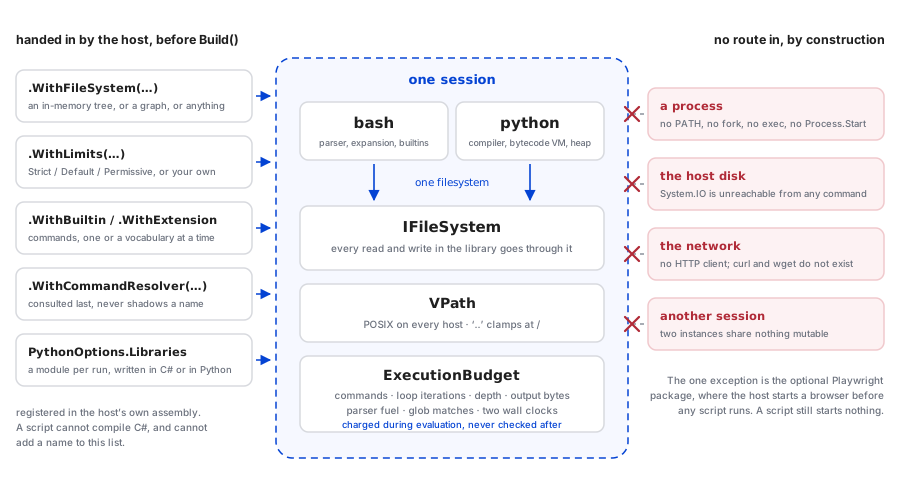
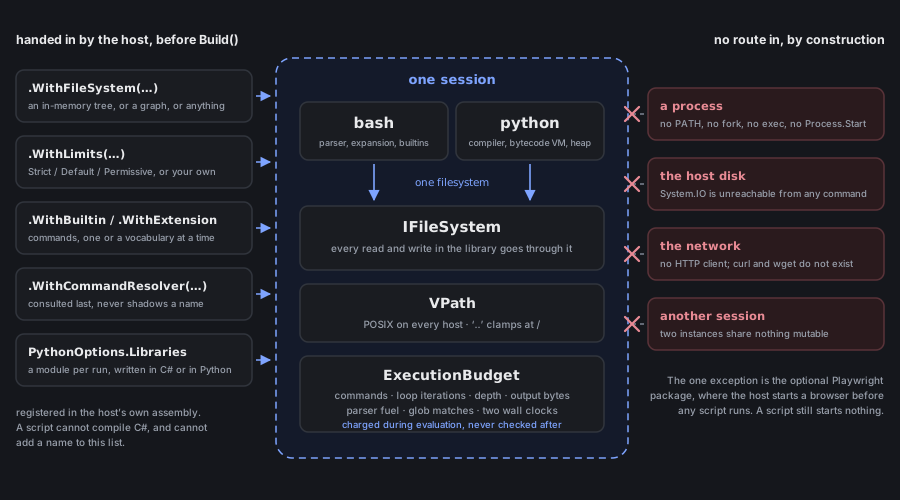
Five properties, and each of them is a thing the code cannot do rather than a thing it is asked not to.
No process spawning. Every command is a managed implementation. There is no PATH, no
fork, no exec, and Process.Start does not appear in the library. A builtin that shells
out would be a bug, not a shortcut.
No ambient filesystem. Nothing is behind / but what the host put there, as above.
No ambient network. There is no HTTP client in the library. curl, wget and friends
are not implemented, so they are not commands that refuse; they are names that do not
exist:
$ type curl
bash: type: curl: not found
$ curl https://example.com
bash: curl: command not found
$ echo $?
127
Deterministic limits, charged during evaluation. Command count, loop iterations, total loop iterations across nested loops, function depth, nesting depth, output bytes, input bytes, parser fuel, glob matches, brace expansions, and two wall clocks, one for the whole run and one for parsing alone.
var strict = Bash.CreateBuilder().WithLimits(ExecutionLimits.Strict).Build();

await strict.ExecAsync("for i in $(seq 1 100000); do :; done; echo reached");
// exit 1
// bash: resource limit exceeded: max_loop_iterations (limit: 1000)
Three profiles ship (Strict, Default, Permissive), and every cap is a record with
init setters, so a host takes one and adjusts:
.WithLimits(ExecutionLimits.Default with
{
    Timeout        = TimeSpan.FromSeconds(120),
    MaxCommands    = 100_000,
    MaxOutputBytes = 4_000_000,
})
Two things about limits matter more than the list. The first is that
MaxTotalLoopIterations exists at all: without it, n nested loops each capped at 10,000
permit 10,000ⁿ iterations, and the per-loop cap is decoration. The second is that a limit
raises rather than quietly stopping. A traversal that hit a depth cap and returned what
it had would report a subset of a tree as though it were the whole tree, and a model reading
that output has no way to tell.
That principle shows up twice in the same feature. Depth is bounded where paths are created and again where they are walked:
| What it is | What happens at it | |
|---|---|---|
FsLimits.MaxDepth (64) |
the cap on a path the filesystem will create | mkdir refuses; the tree cannot get deeper |
PythonOptions.MaxDirectoryDepth (64) |
how deep a traversal descends | raises OSError, which the program can catch |
os.walk(..., max_depth=N) |
the caller's own bound | ends the walk cleanly: this is asking for less, not hitting a limit |
The first is the real containment: nothing can walk depth that cannot exist. The second only
matters for a host-supplied IFileSystem over storage this sandbox did not build, where a
tree can be arbitrarily deep or, through a link to its own ancestor, bottomless.
Multi-tenant isolation. Two sessions share no mutable state. This is also why the extension points below have the shapes they have.
Four ways in, and none of them is a way out
A host adds vocabulary. It never adds authority. Everything registered runs under the same limits, against the same virtual filesystem, with no route to the host that the sandbox did not already have.
var bash = Bash.CreateBuilder()

    // A related set of commands, granted as one unit.
    .WithExtension(new TicketsExtension())

    // One command, straight from a delegate.
    .WithBuiltin("queue-size",
        context => ExecResult.Ok($"{context.State.Get("QUEUE_SIZE") ?? "0"}\n"),
        llmHint: "queue-size: how many tickets are waiting.")

    // A name space too large to enumerate, answered one name at a time, consulted last.
    .WithCommandResolver(new RunbookResolver(catalogue))

    // Withheld: the session has no such command, and no script can discover one.
    .WithoutBuiltins("tar", "curl", "wget")

    // Python libraries, importable from the `python` command.
    .WithPython(new PythonOptions
    {
        Libraries = [PythonLibraries.Tickets(), PythonLibraries.Formatting()],
        HostFunctions = PythonLibraries.HostFunctions(),
    })

    .Build();
Each has a rule attached to it.
A builtin is shared by every execution of every session it is registered with, so it
must be stateless and thread-safe. Everything one invocation can see arrives in its
BuiltinContext.
A resolver is consulted last (after shell functions, after registered commands, after
the search for a script in the filesystem), so it can extend the vocabulary but never shadow
it. The price is that its names are not enumerable, and it pays that price honestly: they do
not appear in type, in command -v, or in Bash.BuiltinNames, because the host cannot
list them either.
A withheld name is absent, not refusing. WithoutBuiltin is applied after every
registration, so it loses to nothing, and the result is exit 127 and command not found,
the same answer as a name that was never implemented. A script cannot discover the shape of
what it was denied.
A library is built per run. PythonRunner.Modules hands one object to every run, which
is right for a constant table and wrong for anything a program can mutate: that would be one
tenant's state becoming another's. Libraries builds a fresh module per run, which is why a
library written in Python, module-level state and all, goes through that route.
Writing a command in C# does not weaken it
Host code is not beside the sandbox; it is handed the sandbox's own environment and gets nothing else.
// A command, in C#.
.WithBuiltin("upper", async (context, token) =>
{
    var text = await context.ReadTextAsync(context.Arguments[0], token);
    await context.WriteTextAsync(context.Arguments[1], text.ToUpperInvariant(), token);
    return ExecResult.Success;
})

// A function Python can call, in C#.
.WithPython(new PythonOptions
{
    HostFunctions = new()
    {
        ["disk_usage"] = (context, args) => new PyInt(Total(context.RequireFileSystem(), args)),
    },
})
BuiltinContext on the shell side and PythonHostContext on the Python side carry the same
things (the virtual filesystem, the working directory, the environment the script exported,
the run's limits and its clock) and nothing else. There is no host disk, no process and no
network behind either of them.
They read that environment live, not from a snapshot, so a cd earlier in the script is
where host code finds itself:
$ mkdir -p /srv && cd /srv
$ python -c "print(whereami())"
desk:/srv
$ cd / && python -c "print(whereami(), disk_usage('/var'), 'bytes in /var')"
desk:/ 86 bytes in /var
And because the sandbox has no ambient anything, host code that needs storage where there is
none says so in the program's own language: RequireFileSystem() raises a Python OSError
the script can catch, rather than letting a host exception escape into it. That distinction
matters: a ShellException reaching a sandboxed program is the sandbox leaking, not
an error the program can handle.
There is deliberately no way to compile C# from inside a script. Host code is registered by the host, in the host's own assembly, before the session is built. That is what keeps the reachable surface a list somebody wrote.
What that looks like end to end
samples/Computerwelt.Sample.Extensibility
is a support desk in about 450 lines: a ticket command in C# storing to /var/tickets.tsv,
a tickets Python library reading the same file, a formatting library written in Python, two
C# functions in the program's globals, a resolver for an open-ended runbook catalog, and three
commands taken away. Running it prints:
== the shell ==
#1 [closed] Coffee machine is down
#2 [open] VPN drops on Wi-Fi
#3 [open] Badge reader is slow

== python, over the same filesystem ==
ID  STATUS  TITLE
--  ------  ----------------------
1   closed  Coffee machine is down
2   open    VPN drops on Wi-Fi
3   open    Badge reader is slow

== C# functions, over the live environment ==
desk:/srv
desk:/ 86 bytes in /var

== and one that was withheld ==
exit status 127
bash: tar: command not found

== 128 commands, of which the host added ==
python, queue-size, ticket, ticket-export
That last line is the point. The vocabulary a session has is a list somebody wrote, it can
be printed, and tar is not on it.
The one exception, and why it is one
Computerwelt.Playwright is an optional package that makes Playwright's Python sync_api
importable inside the sandbox, over Microsoft's .NET driver. A browser is a process, and the
first rule of this repository is that the sandbox spawns none.
The rule is not weakened but moved. The host starts the browser, in host code, before any
script is parsed; inside the sandbox p.chromium.launch() hands back a view of what is already
running, and a launch option a script passes (headless, args, executable_path, proxy)
is refused by name rather than ignored. Ignoring it would leave a script believing it had
asked for something.
Everything else survives by construction:
AllowedHostsis empty by default and enforced as aRouteAsync("**/*")filter on every context, not only on thegotoa script typed, because a page redirects, loads images, embeds iframes and callsfetchon its own behalf.gotois checked too, purely so the error names the URL the script wrote.file:is not an allowed scheme with or without a wildcard.- Every path in the API is a virtual path. A screenshot's bytes come back to this process
and go out through the run's
IFileSystem; an upload is sent as a payload the sandbox read.record_video_dir,record_har_pathanddownloads_pathare refused rather than redirected, because there is nowhere honest to put them. - A context per script is the isolation unit (Playwright isolates cookies, storage and cache per context), so one browser with a context per run is both the cheap arrangement and the correct one.
- The error translation is total. The first version matched
PlaywrightExceptionand let everything else through; the browser tests found the hole immediately, because the .NET driver raises the framework's ownSystem.TimeoutExceptionfor a wait that ran out. A host exception was escaping into a script that could neither catch it nor print it.
Then /report/home.png is a file in the virtual filesystem, which the shell around the
script can ls and cat. Nothing reached the host's disk.
That is the library. Part 3 is what we built on it: Sudo,
the assistant in Curiosity Studio, whose entire tool surface is one shell over a
filesystem that is the workspace's own configuration.
Read next
Articles on context graphs, enterprise search and industrial AI